The Packaged Terminal Air Conditioner (PTAC) component always contains both a cooling coil and a heating coil. To model a PTAC that only cools or only heats, disable the unused mode through the zone load sequence. Setting the unused airflow to zero or to a very small value either generates an error or limits the whole unit, as explained below.
- Setting up a cooling-only PTAC:
1. Open the PTAC component and, under Supply Air Flow Rates, set Cooling operation, Heating operation and When no heating or cooling is needed to Autosize.
- Set Fan operating mode to 1-Cycling so the fan only runs when there is a load. The When no heating or cooling is needed airflow is only used with continuous fan operation.
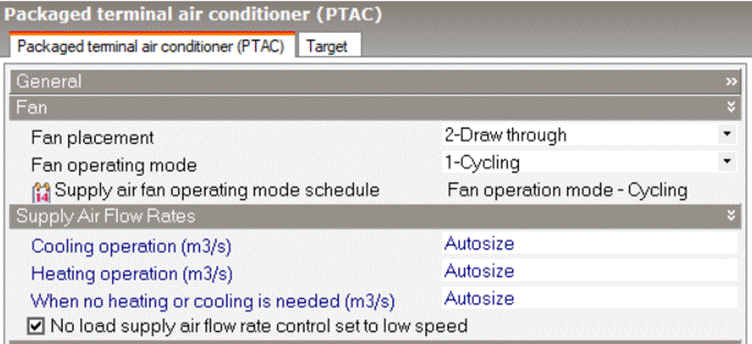
Why not set the unused airflow to zero or to a small value? Setting Heating operation or Cooling operation to 0 generates an error, as these fields must be greater than 0 or set to Autosize. Setting a small fixed value while the other airflows are on Autosize is also not recommended as it may also generate an unexpected behaviour: DesignBuilder sets the supply fan Maximum flow rate from the PTAC supply air flow rates. When fixed and autosized airflows are mixed, the fan Maximum flow rate takes the fixed value. The fan then limits the unit to that small airflow in every mode, including the one you intend to use. As a general rule, do not mix autosized and fixed PTAC airflows. Either set all three to Autosize, or fix all three and check that the fan Maximum flow rate matches the largest of them. |
2. Open the HVAC Zone, go to the Sequence tab and set Load distribution scheme to 1-Sequential Load.
3. Under Sequential Heating Fraction Schedules, select a schedule with a value of 0 (e.g. Off 24/7) for the PTAC.
- The PTAC then takes none of the heating load and passes it to the next equipment in the Heating Calculation Sequence, whatever its position in the sequence.
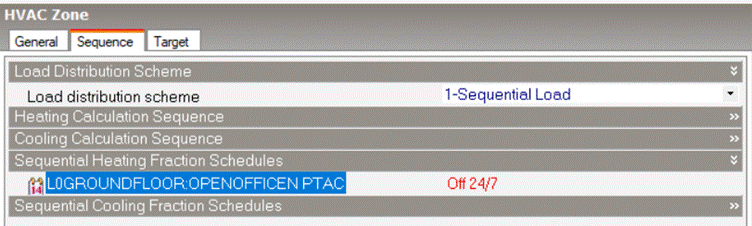
4. If the zone needs heating, include another item of zone heating equipment (e.g. a convector) with a non-zero heating fraction schedule.
5. Optionally, also set the Availability schedule of the PTAC heating coil to Off 24/7.
- Setting up a heating-only PTAC:
Follow the same steps with the modes reversed:
1. In step 3, use Sequential Cooling Fraction Schedules to give the PTAC a schedule with a value of 0.
2. In step 5, set the Availability schedule of the PTAC DX cooling coil to Off 24/7.
3. Include another item of zone cooling equipment if the zone needs cooling.
- Sizing a cooling-only PTAC on cooling:
Fraction schedules and availability schedules only affect operation, not sizing. When autosized, the PTAC supply airflows, the fan Maximum flow rate and the DX cooling coil rated airflow are sized from the larger of the zone design cooling airflow and the zone design heating airflow.
A cooling-only PTAC in a zone with a larger heating design airflow is therefore sized on the heating airflow. This oversizes its cooling airflow, fan and DX cooling coil.
- Sizing
1. Open the HVAC zone and, under Sizing > Heating Sizing, set Heating design air flow method to 3-Design day with limit.
2. Set Heating maximum flow per zone floor area and Heating maximum air flow to values that keep the limit below the zone design cooling airflow. Setting both to 0 leaves the heating maximum air flow fraction as the only limit.
- The zone design heating airflow is capped at the largest of these two limits and the heating maximum air flow fraction, which is a fraction of the zone design cooling airflow. The fraction is not currently shown in the interface, but it is applied with a default value of 0.3.
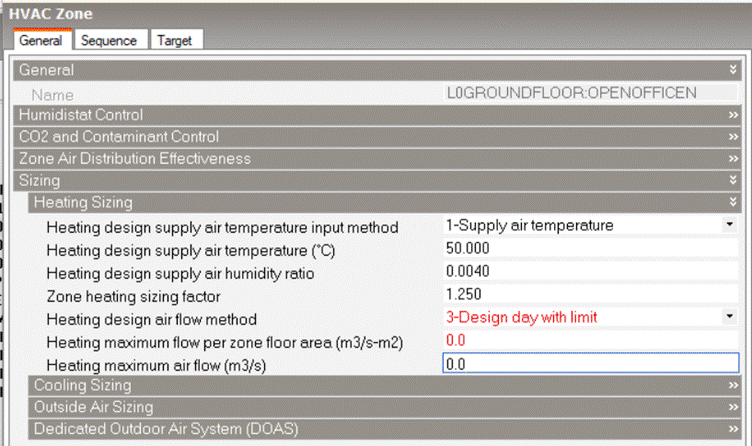
Note that this reduces the zone design heating airflow for all equipment in the zone that is sized from it. Equipment sized from the zone heating load, such as convectors, is not affected.
- Checking the results:
After the simulation, open eplusout.eio and check:
- The PTAC supply airflows and fan maximum flow (Component Sizing Information) against the zone design cooling and heating airflows (Zone Sizing Information).
- That the fan maximum flow is reported as a design size. A user-specified fan value while any PTAC airflow is on Autosize indicates mixed fixed and autosized airflows.
Was this article helpful?
That’s Great!
Thank you for your feedback
Sorry! We couldn't be helpful
Thank you for your feedback
Feedback sent
We appreciate your effort and will try to fix the article