When the Baseline Building must be generated so that its total window and skylight areas correctly correspond to the Proposed Building, the recommended approach is to set the appropriate Window-to-Wall Ratio (WWR) and Skylight-to-Roof Ratio (SRR) or Building area type before running the Baseline wizard, rather than manually editing openings afterwards.
ASHRAE 90.1-2007/2010/2013
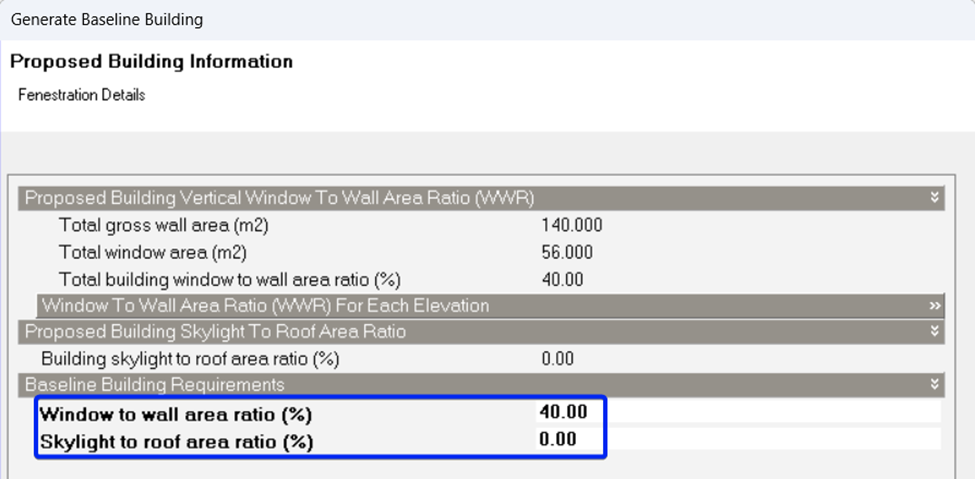
After running the Baseline generation wizard, on the Proposed Building Information:
- Set the Baseline Building Requirements WWR to match the Proposed Building’s vertical WWR.
- Set the Baseline Building Requirements SRR to match the Proposed Building’s SRR.
With these inputs, the Baseline wizard will generate openings whose total areas are consistent with the Proposed Building’s fenestration while still applying the Appendix G rules for construction and system characteristics.
ASHRAE 90.1-2016 and later
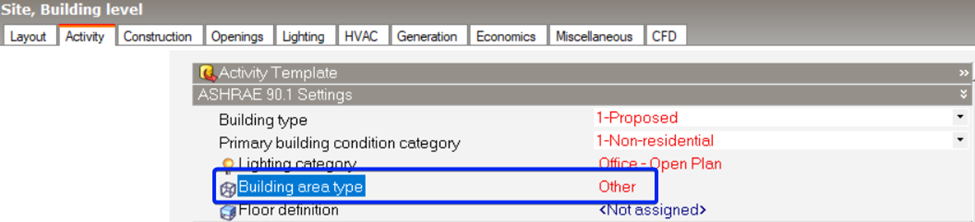
- On the Activity > ASHRAE 90.1 Settings, change the Proposed Building area type to "Other" before generating the Baseline.
- Run the Baseline generation wizard.
When the Building area type is set to “Other”, the Baseline Building is created using the same openings as the Proposed Building, preserving both window and skylight areas for that case.
Was this article helpful?
That’s Great!
Thank you for your feedback
Sorry! We couldn't be helpful
Thank you for your feedback
Feedback sent
We appreciate your effort and will try to fix the article