Why the holiday settings get reset when the Activity template is applied:
The holiday settings are loaded from the Sector, which is selected as part of the Activity template. Therefore, if you customise the holiday settings directly at Building level and then later change the Activity template, the holiday settings will be reset to default because the Activity template loads the holiday data associated with its selected Sector.
How to prevent this:
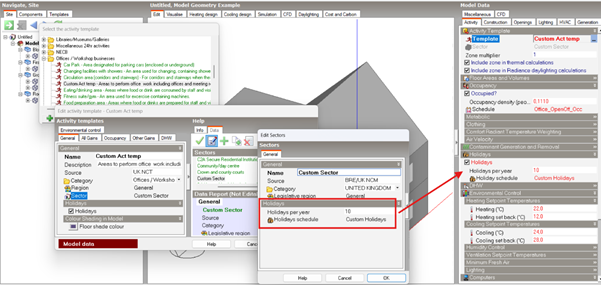
To avoid this, you can create a custom Activity template linked to a custom Sector, and then customise the holiday settings within that Sector. This way, the holiday settings are part of the custom Sector associated with your Activity template and will be retained when the template is applied.
In other words, the setup would be:
Custom Activity Template → Custom Sector → Custom Holidays
See the image below for an example:
Alternative:
Alternatively, you could consider making the final changes to the holiday settings after you have finished applying the Activity templates.
See also Program Help: Holidays
Was this article helpful?
That’s Great!
Thank you for your feedback
Sorry! We couldn't be helpful
Thank you for your feedback
Feedback sent
We appreciate your effort and will try to fix the article