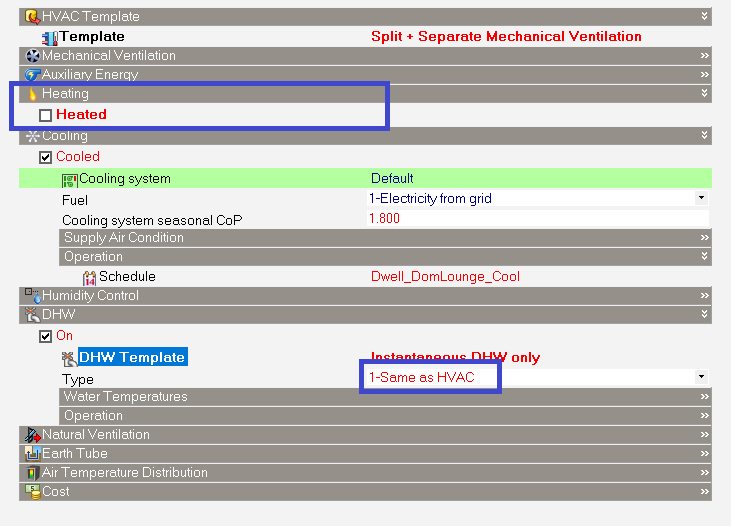
When configuring Domestic Hot Water (DHW) under Simple HVAC with the DHW type set to 1-Same as HVAC, DesignBuilder inherits the DHW heating fuel and Coefficient of Performance (CoP) directly from the zone's primary heating system settings.
If the Heated checkbox for that zone is unchecked, DesignBuilder still uses the Coefficient of Performance (CoP) and Fuel from the zone's heating system for domestic hot water calculations.
Because the Heated settings are hidden from the dialog when Heated is unchecked, the CoP and Fuel values actually being used are not shown anywhere on screen, which can make results difficult to interpret.
- Why this happens:
The 1-Same as HVAC option is designed to reuse the heating system's CoP and Fuel settings for hot water, rather than asking you to enter them separately. When Heated is unchecked for a zone, DesignBuilder hides the Heated settings for that zone, including the CoP and Fuel fields, but it continues to use whatever values are set behind the scenes for the DHW calculation.
- How to check which CoP and Fuel values are being used:
1. For the zone in question, temporarily tick the Heated checkbox.
2. Note the CoP and Fuel values now shown in the Heating settings — these are the values being used for the DHW calculation.
3. Untick Heated again to return the zone to its original state.
Note that this only reveals the values that are already being used — it does not change how DesignBuilder calculates DHW when 1-Same as HVAC is selected.
- How to avoid the issue:
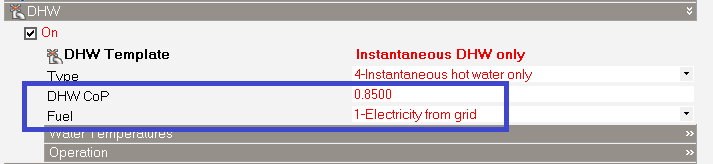
1. Open the DHW settings for the zone or zone template in question.
2. Instead of 1-Same as HVAC, set the CoP and Fuel fields explicitly with the same values as the heating system.
This gives the same results as 1-Same as HVAC, but keeps the CoP and Fuel values visible on screen regardless of whether Heated is ticked.
Was this article helpful?
That’s Great!
Thank you for your feedback
Sorry! We couldn't be helpful
Thank you for your feedback
Feedback sent
We appreciate your effort and will try to fix the article