DesignBuilder version 6 does not support forward compatibility and this means that it's not possible to load models saved in newer versions into version 6 and older releases.
See DesignBuilder dsb file version compatibilityThe workaround to move the geometry to an older version is:
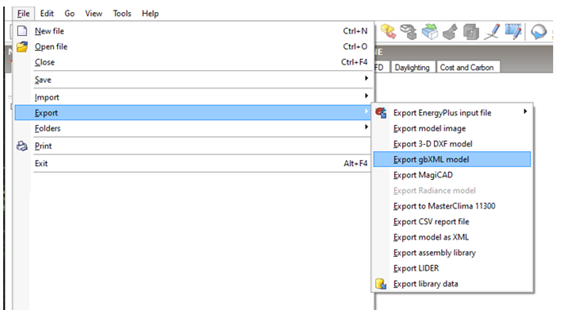
1- Open the original file in V7 and export the gbXML file: Go to File > Folder > Export > Export gbXML model
2- With V6 Create a New File and insert New Building and use the Import 3-D model tool
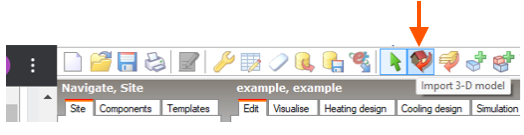
2- With V6 Create a New File and insert New Building and use the Import 3-D model tool
3- Select the XML file and click on Next, keeping the settings as below:
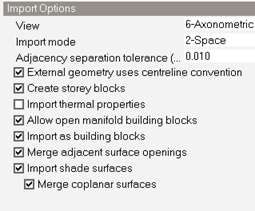
NB: You can import thermal properties, however, it is important to verify their names and if they have the correct information.
Components and templates can be exported and imported through DDF files and imported back.
You can also preview the imported geometry.
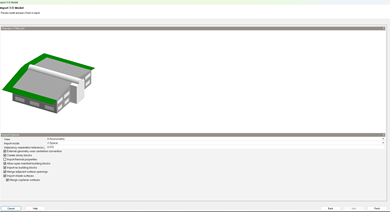
4- After clicking Finish and the importation process is concluded, you will receive the following message:
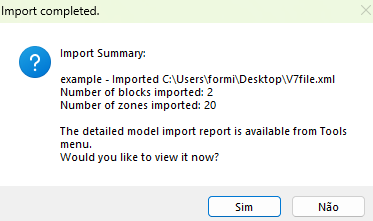
After the geometry is imported you have to redraw the component blocks (shading, adiabatic or ground blocks) and any PV panels if needed.
Besides the component blocks the following items need to be configured as desired:
- Activity tab
- Construction tab
- Opening tab
- Geometry Convention Template
- Lightning tab
- HVAC tab
Was this article helpful?
That’s Great!
Thank you for your feedback
Sorry! We couldn't be helpful
Thank you for your feedback
Feedback sent
We appreciate your effort and will try to fix the article